
How to Get an Online Phone Number for Business
Stop juggling calls! Discover how an online phone number instantly separates work and personal life, and makes managing your business calls easy.

Updated On :
February 11, 2026

As a company expands, its call volume – both incoming and outgoing – tends to skyrocket. Relying on personal phones to handle this surge can lead to severe consequences. At this crucial juncture, a virtual phone or an online phone number for business becomes a necessity – a lifeline for seamless communication.
An online (virtual) phone number is a cloud-based number that routes calls over the internet to any device. Businesses use it to separate personal and work calls, enable IVR/call forwarding, and scale support without hardware. Here’s how to choose, set up, and publicize one.
Having a reliable means of communication, like a phone number or email address, is a must for any business. Setting up a free online business phone number is a smart way to establish your firm as a professional, authentic enterprise. The web is brimming with options for companies of all sizes, from fledgling start-ups to well-established corporations.
What Is an Online Phone Number?
An online (virtual) phone number is a cloud-based phone number that uses VoIP to route calls over the internet to any device. It isn’t tied to a SIM card or physical location and supports professional features like IVR, call forwarding, voicemail, and call recording.
It enables companies to have a local or toll-free number in an alternative area code so that clients can contact them at a local rate. Moreover, it can be used to set up IVR (Interactive Voice Response) features, voicemail, and call forwarding.
Virtual phone numbers come in handy in a variety of circumstances, but for the majority of individuals, the ability to place calls without disclosing their personal number will be helpful. However, for organizations, it’s a terrific way to quickly and cheaply set up multiple phone lines without connecting to a physical switchboard.
How Does an Online Phone Number Work?
An online phone number, often referred to as a virtual number or cloud phone number, operates differently from traditional telephone numbers associated with landlines or smartphones. Virtual phone numbers are cloud-based and are linked to an existing telephone number you already own. This flexibility allows you to stay connected without being confined to a specific device or location, making it ideal for businesses and individuals working remotely or traveling.
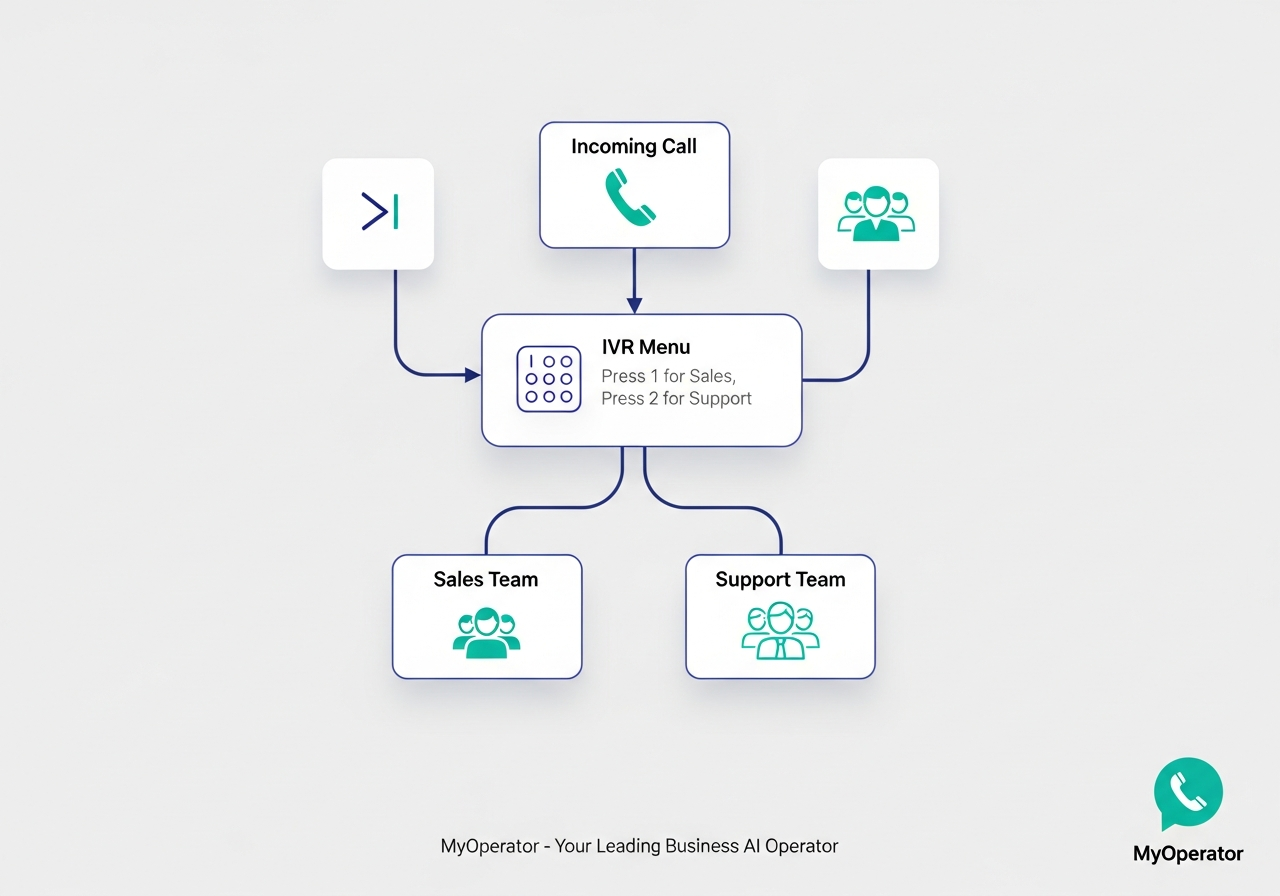
- Virtual phone numbers use VoIP (Voice over Internet Protocol) to make and receive calls over the internet.
- Because calls are internet-based, users are not tied to a specific device or location.
- This freedom allows you to handle business calls from anywhere on any connected device.
- The reliability of virtual phone services depends on your internet connection’s stability and quality of service (QoS).
For businesses seeking an online business contact number or exploring how to get a phone number for business purposes, virtual phone numbers offer a versatile solution.
Whether you are looking for an online phone number for business operations, a virtual phone number for a small business, or a convenient online contact number, embracing cloud telephony can enhance your connectivity and streamline communication processes.
Signs Your Organization Needs an Online Phone Number
- Prospects and clients can’t get in touch with you easily.
- Your organization is growing significantly, and call volume is increasing.
- Your personal and business calls interfere with one another.
- You have a mix of full-time, part-time, and remote employees.
- You find it challenging to manage and respond to voicemails and missed calls.
- You lack advanced call management features like IVR, call recording, or analytics.
Benefits Of an Online Phone Number
The following are some advantages of an online phone number:
Offers synced inter-device communication:
Stay easily reachable across smartphones, tablets, laptops, and more. Experience seamless communication within the same building or across continents. Alerts across all connected devices prevent missed calls, ensuring accessibility even if your phone is left behind.
Cost-effective choice for enterprises:
Small businesses can save significantly. Virtual phone numbers eliminate the need for expensive multiline hardware. Cost-effective plans often include at least one free virtual phone number and affordable global call rates.
Maintains privacy
Link virtual phone numbers to a private telephone number for added privacy. This is ideal for sole proprietors who want to keep personal numbers private while running a business.
Remote work and travel convenience:
The online phone number for business/, or virtual numbers is perfect for the increasing shift towards remote work. It provides freedom from staying in one location or being tied to a single device, catering to remote companies and professionals on the move.
Access to integrations and services:
Upgrade options offer beneficial features like a virtual receptionist, voicemail transcription, and team messaging. Integration possibilities with popular services like Microsoft 365, Zoho, Salesforce, and more can streamline your workflows. Enhanced communication efficiency through features like online faxing and teleconferencing.
Virtual phone numbers can be an affordable choice for companies looking into solutions such as online business contact numbers or online phone numbers. It also offers the flexibility required for the changing nature of business operations and remote work.
Choosing the Right Type of Online Number
Before selecting a provider, it's important to understand the different types of virtual numbers available and which one best suits your business needs.
Technical & Compliance Requirements
Bandwidth and quality of service (QoS)
Your call quality depends directly on your internet connection. For reliable VoIP, ensure your network meets these minimums:
- Bandwidth: Plan for at least 100 kbps per concurrent call.
- Latency: Should be less than 150 ms.
- Jitter: Should be less than 30 ms.
- Packet Loss: Must be below 1%.
Prioritizing VoIP traffic on your router settings can significantly improve call clarity.
Regulatory compliance in India (TRAI/DoT)
In India, online phone numbers are fully legal when provided by a licensed operator. It's crucial to adhere to guidelines set by the Department of Telecommunications (DoT) and the Telecom Regulatory Authority of India (TRAI).
Key considerations include completing Know Your Customer (KYC) norms, adhering to number masking policies, and understanding regulations around number portability. Always choose a provider that is compliant with local regulations. Learn more at the DoT website.
How to Get an Online Phone Number for Business in 5 Steps
It’s surprisingly simple to get a business phone number online. Several businesses let you get one with the country or area code of your preference.
For commercial purposes, small business owners must obtain a business phone number. Even though a lot of small business owners use their personal numbers to place and receive calls for work, this method is not the most efficient.
A unique company phone number helps you distinguish yourself from the competition. Additionally, it presents your company to your target market in a professional manner.
The steps you must take to obtain an online phone number for your business are covered here:
Step 1. Research and choose a provider
Researching providers is the first step in obtaining an online phone number for business. Virtual number providers are abundant in the market; therefore, it’s crucial to evaluate their features and costs.
When comparing providers, use this checklist to ensure they meet your business needs:
- Uptime SLA: Look for 99.9% or higher.
- Call Quality: Ensure they guarantee a MOS score > 4.0.
- Core Features: Call recording, IVR depth, and call queues.
- Integrations: Check for native CRM and Helpdesk integrations.
- Compliance: Verify the KYC process and TRAI compliance.
- Support: Confirm support hours and channels (phone, email, chat).
- Security: Look for certifications like ISO 27001.
- Total Cost: Understand per-minute rates, monthly fees, and add-on costs.
Apart from the above, you should look into the service provider’s history as well as their former clients, which will help you choose suitable providers.
As a Business AI Operator, MyOperator specializes in giving both virtual and online mobile numbers. In India, we are one of the first companies to offer virtual phone numbers. We have been successfully providing virtual phone numbers for more than ten years and counting.
MyOperator’s investment in technology and customer-centric approach sets us apart, attracting esteemed clients such as Razorpay, Samsung, Lenskart, Myntra, and Muthoot Finance. Our proudest moment was when Prime Minister Mr. Narendra Modi used our service in his “Mann ki Baat ” broadcast. We cherish our satisfied clientele.
You can also find feedback from our clients in our testimonials, as well as on software directories like Capterra, G2, and SoftwareSuggest.
Step 2. Pick your business number
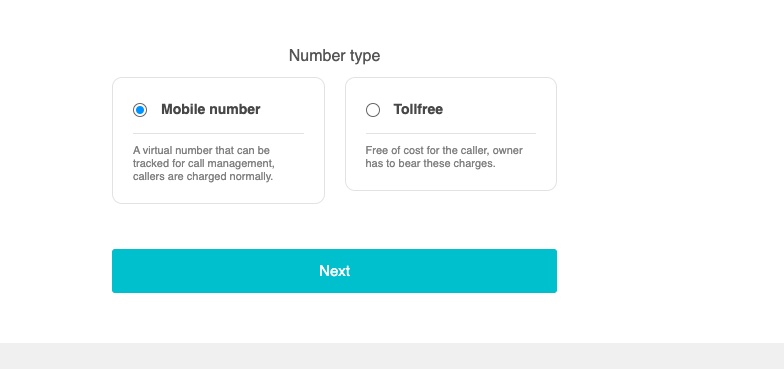
The next step is to choose a number after choosing a service provider. There are several different local and toll-free numbers available from different providers. Think about the ideal area code for your company and if you want a local, toll-free, or vanity number.
Select the ideal number for your business requirements. A toll-free number is an excellent option for customer assistance, as it allows customers to contact you for free. If you require a number to sell your products, an online phone number for business would be more appropriate.
A virtual number is ideal for businesses with numerous agents who need a single number to communicate with clients.
It’s remarkable that with a virtual number, you can establish distinct departments within the platform, assign agents, and use a single virtual number for all of them.
Step 3. Configure call routing & IVR
You must configure call routing after selecting a phone number. This procedure involves routing incoming calls to your virtual number to either your main office phone, a specific department, or a group of remote employees.
Many service providers give a variety of call routing options, including forwarding to a landline, cell phone, or virtual call center software. Choosing the right call center software can greatly enhance your call-routing capabilities and improve customer service efficiency.
Live call transfer is a feature that demands advanced technology. MyOperator, a leading cloud call center solution provider, has invested in cutting-edge technology that allows for easy live call transfers between agents. The call will be transferred to inter-departmental agents based on their availability, reducing customer wait time.
Moreover, you can use your online phone number to:
- Reduce the need for human intervention during the earliest stages of calls and transfers by using an interactive voice response (IVR) system.
- Enhance the entire customer experience by optimizing the design of the call flow.
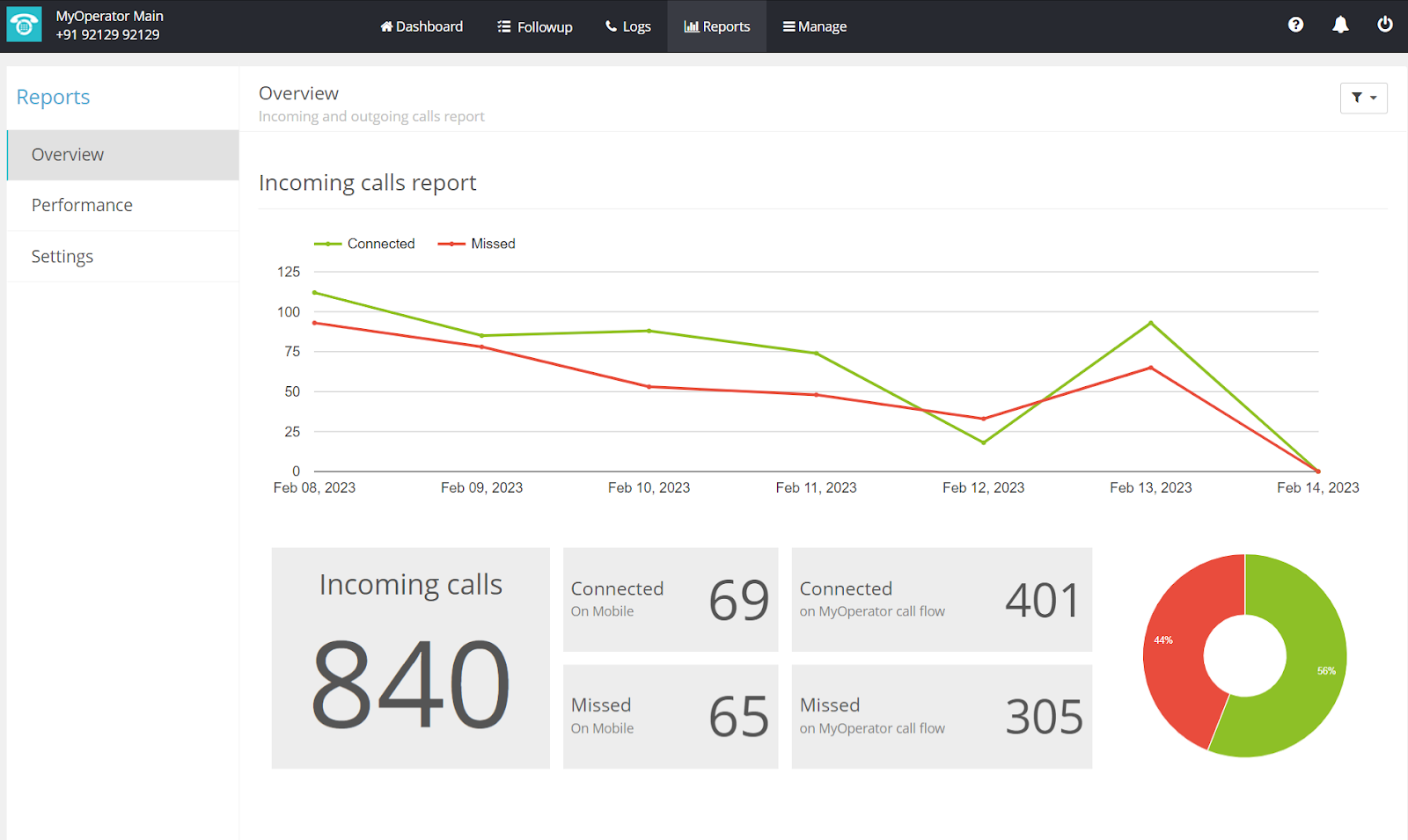
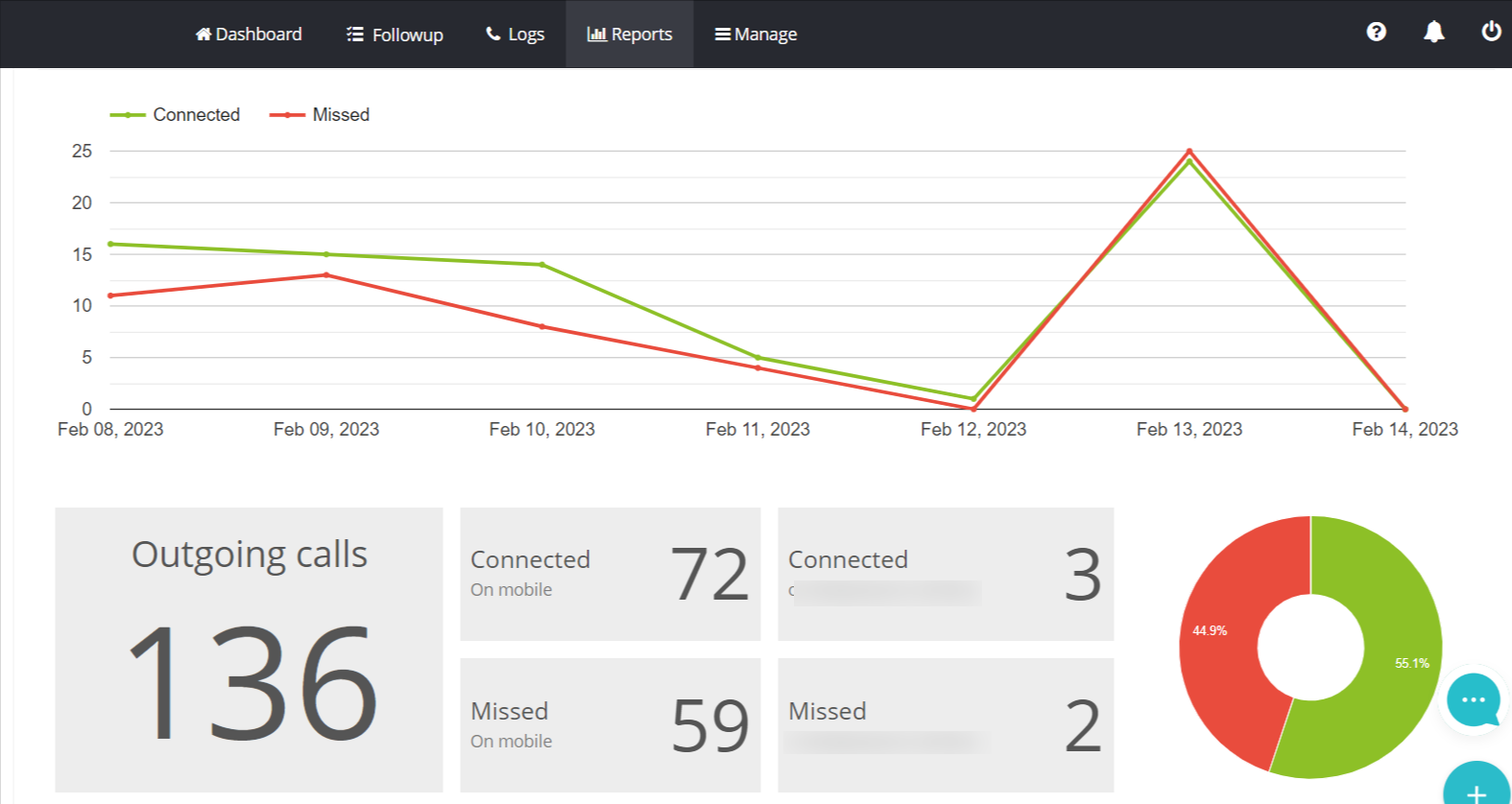
You can monitor agent performance, call routing, and other activities in the report section of your dashboard. This allows you to access concise performance summaries for your agents.
Incoming calls report on MyOperator dashboard:-
Outgoing calls report on the MyOperator dashboard.
Step 4. Test your online business number setup
It’s crucial to test your online business number setup to ensure everything is operating properly before using your new virtual phone number for business calls. Test calling your virtual number to make sure the call is connected, is being routed to the right agent or department, with good call quality.
MyOperator provides:
- Easy setup options
- 24/7 support for implementation
- Call flow analysis from MyOperator’s dedicated team.
Step 5. Publicize your new business number
It’s crucial to tell your customers about your virtual phone number once you’ve configured it and checked it.
List your online business contact number or virtual phone number on your:
- Website
- Business cards
- Social Media Channels
- Other marketing content
Additionally, you can use it as your company’s primary contact number.
Key Integrations for Your Online Phone Number
To maximize efficiency, integrate your online phone number with your existing business tools. Top providers offer seamless integrations with leading platforms, allowing you to sync call data, create contacts, and trigger automations directly from your calls.
- Salesforce: Log calls automatically, click-to-dial from contact records, and track call outcomes within your CRM. Learn more about Salesforce CTI.
- Microsoft 365: Sync contacts, schedule meetings through calls, and integrate with Microsoft Teams for unified communications. Explore Microsoft 365 integrations.
- Zoho CRM: Enable click-to-call, get screen pops for incoming calls, and log all conversations against customer records automatically.
Get Your MyOperator Online Phone Number
Dial our number, 92129 92129, to learn more about how we manage virtual numbers for client communications.
You can also schedule a demo with our experts, who will guide you through each feature mentioned above. SCHEDULE A DEMO
Join for the blogs and insights


.avif)



.webp)


